AI TRIO DANCE · 15 SEC · 9:16
Can Can Dance AI Generator
Upload one photo and get the 15-second Can Can trio video with you, a friend or your pet in the middle: the hop-on entrance, the side kicks, the claps and the arm-linked kick line. The two dancers beside you, the living room and the original sound stay exactly as they are. No dancing skills needed.
- • Credits back if it fails
- • Original sound kept
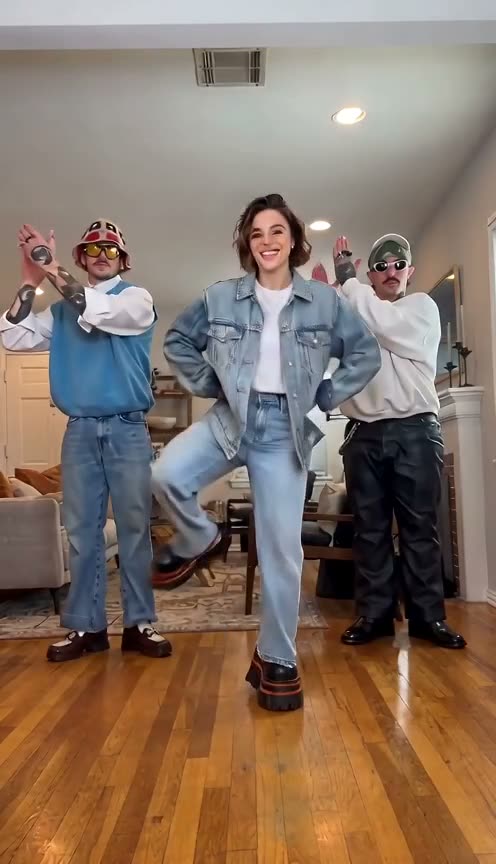
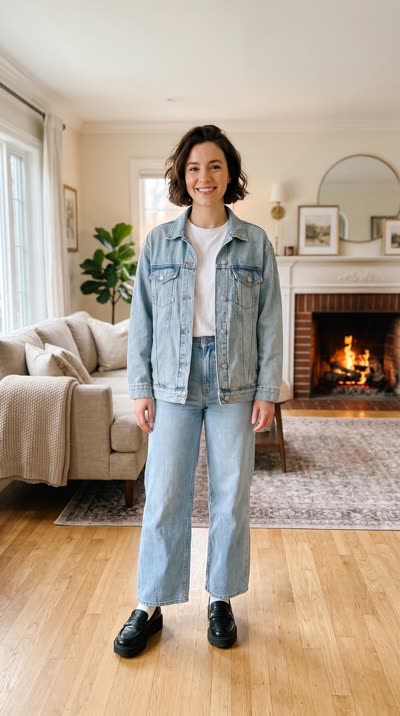
Your photo
THE SHORT ANSWER
What is Can Can dance AI?
Can Can dance AI turns one photo into the viral Can Can trio video. Aidance swaps the one in your photo, a person or a pet, in for the dancer in the middle, so they hop in, kick, clap and finish the arm-linked kick line with the two original dancers at their sides. Every video is the full 15-second 9:16 clip with the original sound, costs 45 credits at 480p or 90 credits in 720p HD, and is ready in 3 to 10 minutes.
Who takes the middle?
The trio hops in and kicks in a line of three. Your photo replaces the dancer in the middle; the two at the sides keep dancing as they are.
The original clip. Your photo replaces the dancer in the middle.
MP4 with the original sound · same trio, room and camera
EVERYDAY CAN CAN
One photo in. Kick line out.
One everyday photo, the full 15-second Can Can. Only the middle dancer changes; the room, the moves and the music stay the same.
Full-body photo
Can Can dance AI example: a woman from one photo kicks and claps in the middle of the trio
THE DANCE
Shot by shot
The Can Can clip, second by second. One fixed camera, no cuts: your video follows the same moves on the same beats.
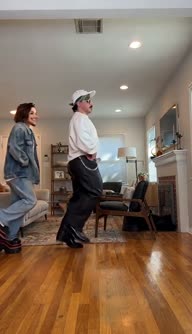
Hop-on entrance
The trio hops into the living room one by one, side-on to the camera, knees high.
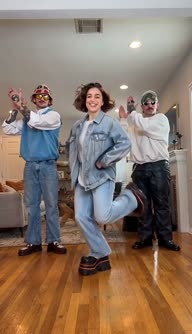
Side kicks
Facing the camera in a row, the three take turns flicking a leg out to the side.
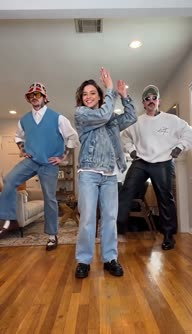
Clap overhead
The middle dancer claps above the head while the two at the sides keep kicking.
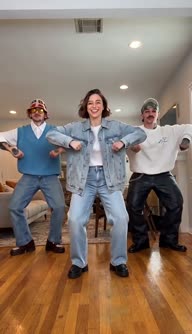
Hands on hips
All three plant their hands on their hips and bounce on the beat.
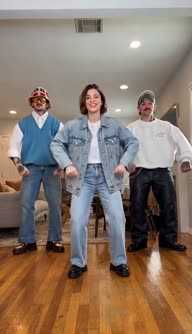
Wide squat
Knees bent wide, elbows flapping: the silly part that makes the Can Can funny.
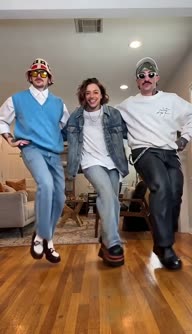
Kick line finish
Arms linked, the trio fires off high kicks together to the last note.
HOW-TO
How to make the Can Can dance AI video
Add one photo
One person or one pet, face clear; head to feet works best.
Sign in and generate
Pick 480p or 720p HD, confirm you may use the photo and press Generate. The cost, from 45 credits, is on the button.
Download and post
In 3 to 10 minutes the 15-second 9:16 MP4 lands here with the original sound, and stays in My videos.
PHOTO CHECK
Will it look like you?
The AI redraws the middle dancer as the one in your photo, frame by frame. The clearer the photo, the more the dancer looks like you.
01
Show the whole body
The Can Can is all legs. A head-to-feet photo gives the AI your build, trousers and shoes to kick with.
02
Keep the face clear
Even light, looking at the camera, no sunglasses, masks, heavy filters or hands in front of the face.
03
One per photo
Crop out other people and pets. With two in the photo, the AI may pick the wrong one.
04
Pets: the whole animal
A sharp photo of your cat or dog from head to tail, standing or sitting, eyes visible.
Head to feet, even light, nothing covering the face. That's what makes it look like you.
PRICES
Pay per video
A Can Can video costs 45 credits at 480p (3 a second) or 90 credits in 720p HD (6 a second), for the full 15-second clip. Buy credits once or take a monthly plan, then make videos whenever you like.
- 500 credits
- 170 credits
Price shown first
From 45 credits, on the button before you generate.
Failed? Credits back
If a video fails, its credits return to your balance automatically.
Unused photos gone in a day
Used only to make your video; unused uploads are deleted after a day.
9:16 · 15 seconds
A vertical 480p or 720p HD MP4 with the original sound, for TikTok, Reels and Shorts.
THE TREND
What is the Can Can dance trend?
The can-can, also spelled cancan, began in the dance halls of Paris in the 1830s and became the signature show of the Moulin Rouge, which opened in 1889: a line of dancers, high kicks and big skirts. The tune everyone hums along to is the "Infernal Galop" from Jacques Offenbach's operetta Orpheus in the Underworld (1858).
On TikTok and Reels the can-can became a joke. Friends in everyday clothes line up in a living room, hop in, flap their arms and finish with an arm-linked kick line, and the more serious the faces, the funnier it gets. The trio clip on this page is one of the most remade versions.
Can Can dance AI skips the rehearsal: one photo puts you, a friend who agreed, or your pet in the middle of the line, with the other two dancers still kicking beside you.
Aidance is an independent tool and is not affiliated with, endorsed by or sponsored by the creators of the original clip. Make videos of yourself, people who agreed, or your own pets, for fun, and do not present them as real footage.
More AI video generators
- The dance
- The can-can, from the dance halls of 1830s Paris
- The stage
- The Moulin Rouge, opened in 1889
- The music
- "Infernal Galop", Jacques Offenbach, 1858
- The trend
- A trio's living-room kick line on TikTok and Reels
- Spelling
- Can Can, cancan or can-can: the same dance
FAQ
Questions, answered
What is the Can Can dance AI generator?
It is a tool that puts you in the viral Can Can trio video. You upload one photo, and the AI replaces the middle dancer with the one in your photo, keeping every hop, kick and clap, the two dancers at the sides, the living room and the original sound.
How do I make the Can Can dance AI video?
Upload a clear photo of one person or one pet, confirm you may use it, and press Generate. The video is ready in 3 to 10 minutes and is saved in My videos, so you can leave the page while it renders.
Which dancer does my photo replace?
Only the dancer in the middle. The two dancers at the sides, the room and the camera stay exactly as they are in the original clip.
Can my cat or dog do the Can Can?
Yes. Upload one sharp photo of your pet with the whole body in view, and it takes the middle spot and kicks along with the other two dancers.
What photos work best?
One person or pet per photo, head to feet, well lit, with the face clearly visible. Avoid group photos, sunglasses, heavy filters and blurry shots.
How long does it take?
Usually 3 to 10 minutes. You can leave the page; the video keeps rendering and is saved in My videos.
How long is the video, and what quality?
Every video is the full 15-second clip, 9:16 vertical for TikTok, Reels and Shorts, in 480p or 720p HD, whichever you pick.
Does the video keep the Can Can music?
Yes. The original sound of the clip stays under your video exactly as it was, so every kick still lands on the beat.
Is there a free Can Can dance AI generator?
A Can Can video costs 45 credits at 480p or 90 credits in 720p HD. New accounts get free credits to try Aidance, and the price is shown on the button before anything is charged.
How many credits does it cost?
A Can Can dance video costs 45 credits at 480p or 90 credits in 720p HD. The cost is shown on the button before you generate, and failed videos are refunded automatically.
Do I need a monthly subscription?
No. You can buy a one-time credit pack, or take a monthly plan if you make videos often. Either way, each Can Can video costs 45 credits at 480p or 90 in 720p HD.
What happens to my photo?
Photos are uploaded over an encrypted connection and used only to make your video. Unused uploads are deleted after a day; the photo used for a video stays in your account with that video until you delete it.
Can I use someone else's photo?
Only with their permission. Use photos of yourself, of adults who agreed to appear in the video, or of your own pet; never children, celebrities or public figures.
Should I label it as AI on TikTok?
Yes. The video is AI-generated, so turn on TikTok's AI-generated content label, or the platform's equivalent, when you post it, and don't present it as real footage.
Take the middle of the Can Can line
- • Credits back if it fails
- • Original sound kept